
原文:How I Turn Any Machine Into a 3D Simulator You Can Take Apart
作者:Elvar(@elvar_official)
一个免费的 Claude Skill,就能把任意机械建成可运行的 3D 模型——带实时仪表盘,每个部件都有对应按钮。下文给出完整安装步骤与全部 9 个提示词。
有一个免费 Claude Skill,能把任意机械做成 3D 模拟器。你可以环绕观察、剖开机体,看着真正在干活的那个零件运转。
封面:用 teardown Skill 构建的可交互 3D 机械模拟器合集。
在 V8 上,你追踪的那个气缸会变成玻璃,你可以看着混合气在里面燃烧,同时压力图画出它的循环曲线。
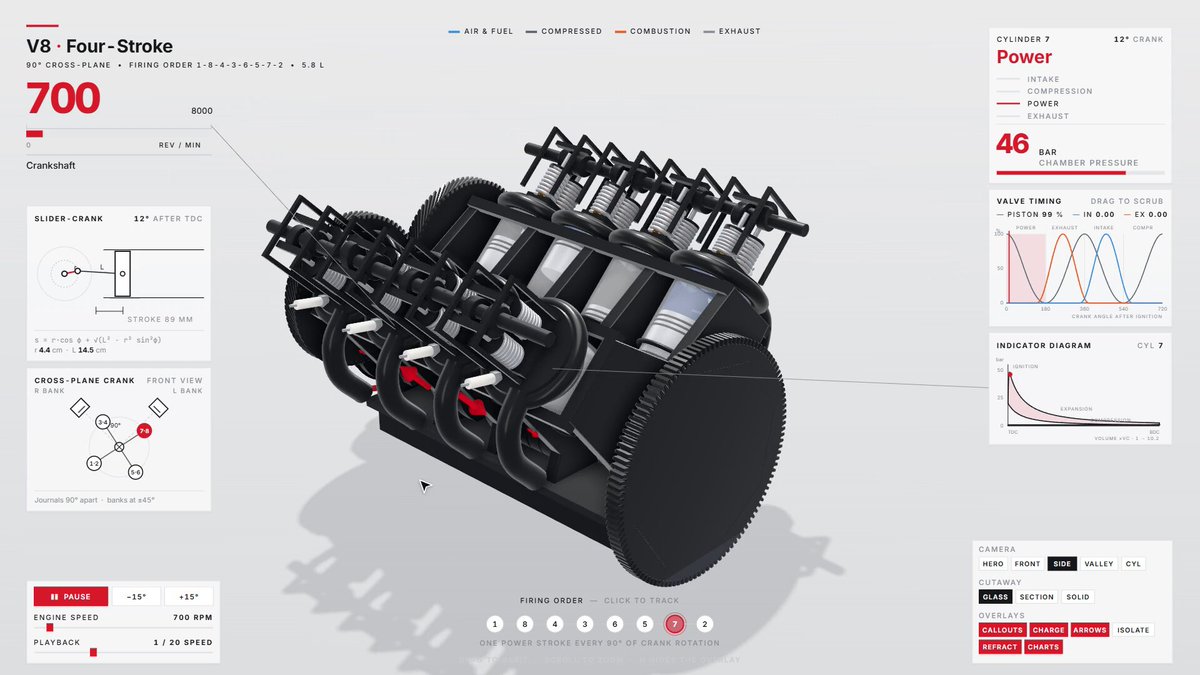
V8 四冲程:节气门开到 2,400 rpm,切开第 4 缸,再看第 2 缸,回到怠速;以 1/20 速度播放。
像这样的 V8 模拟器在 X 上拿到了 3,790,000 次观看。一个用 Opus 5.5 做的野火工具拿到了 1,640,000 次。人们盯着一台机器运转,远比读一篇介绍更久。
它适用于任何有运动部件的东西,甚至是还没人造出来的机器。例如一条长 1,300 m、宽 190 m 的沙虫:
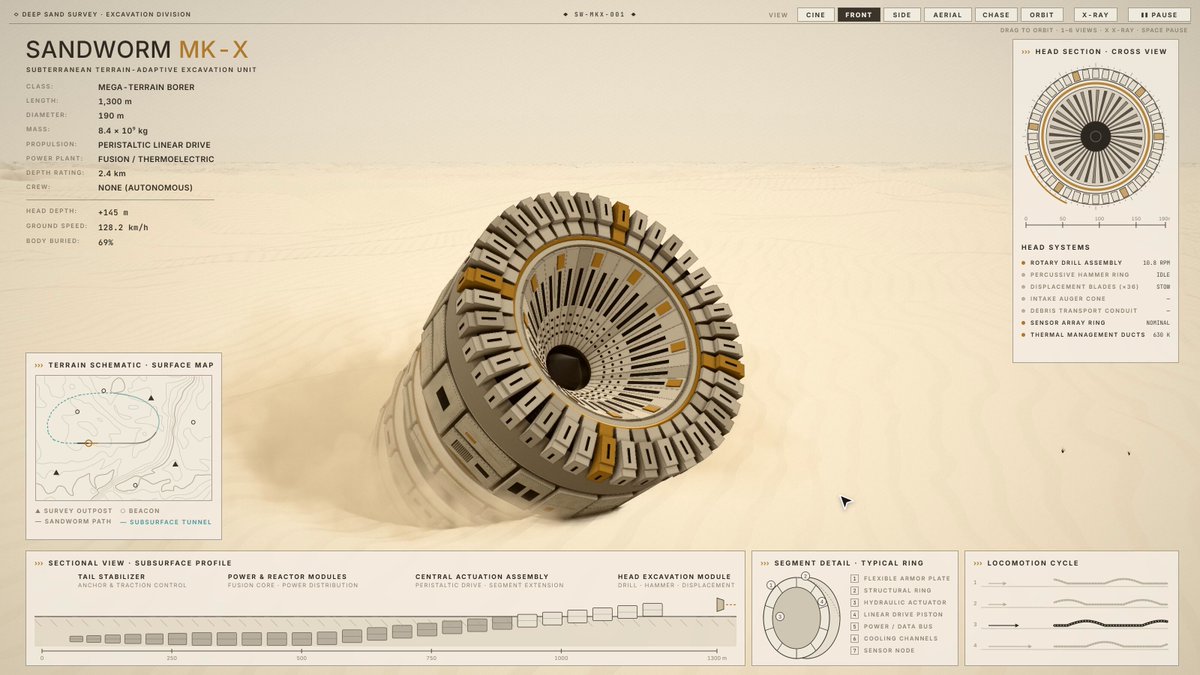
沙虫 MK-X:近距钻头、拱身猛砸、X 光透视埋在地下的身体,然后第二次破土而出。
仪表盘读的是沙虫的真实姿态。头部随钻头转动,深度剖面跟着埋在地下的身体,地图则画出它的轨迹。
还有一只机械水母:
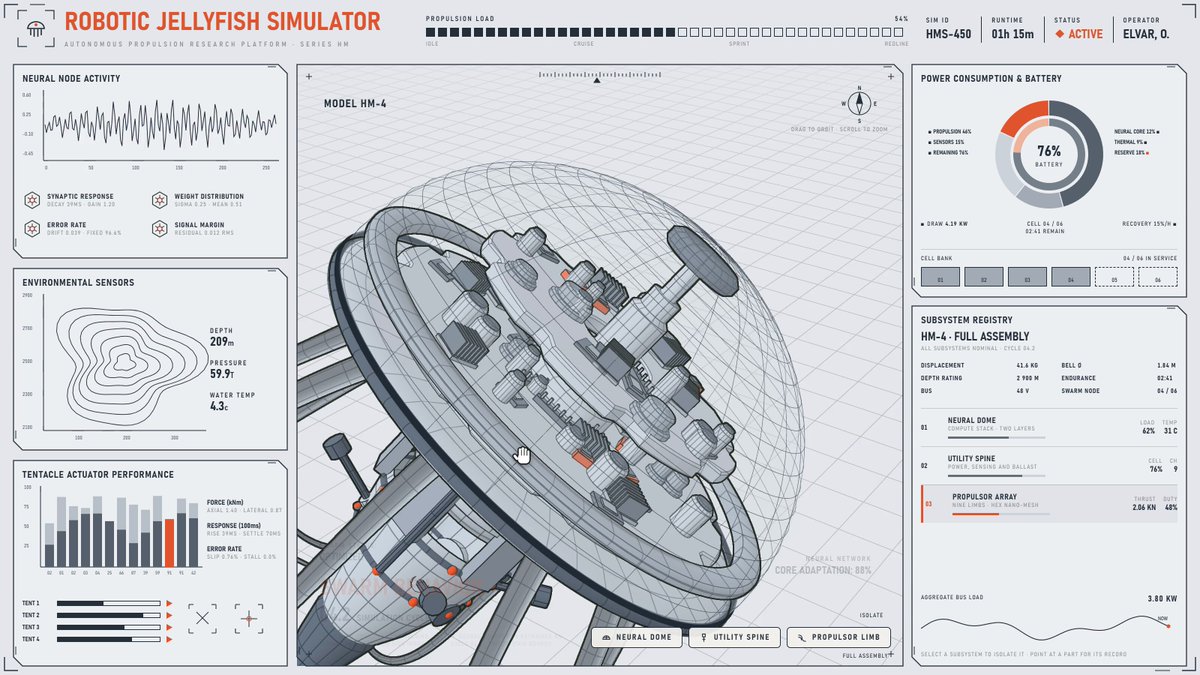
Hydromedusa HM-4:肢节 07 拆到网格层,穹顶裂成 4 层,脊骨炸开。
每个子系统都是一个按钮。按一下,那个部件就会拆开,其余机体让到一边。
我用两天做了 7 个这样的模拟器。Skill 里自带 3 个:V8、Cessna 起落架,以及 Strandbeest。
这个 Skill 叫 teardown。免费,在 Claude Code 里运行。
你在构建什么
模拟器就是一页 HTML,大约 800 KB,可离线使用。我做过的每一个都有同样的 6 个部分。下面以一台步行机器人为例:
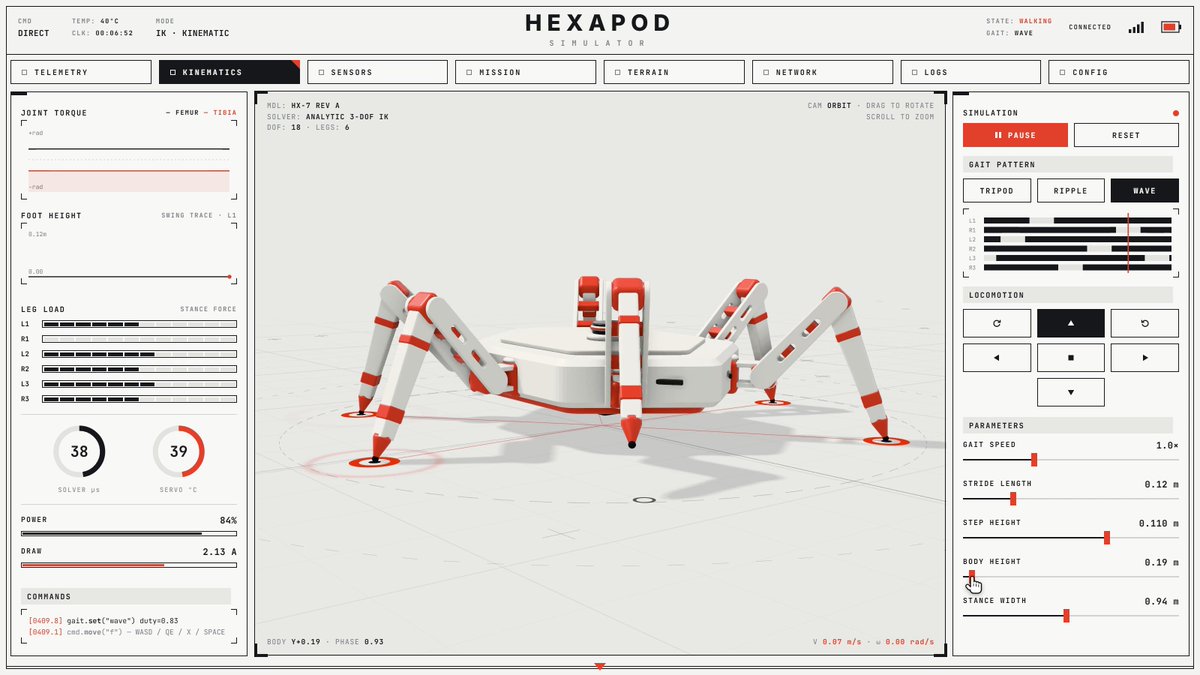
HX-7:机体在波动步态中升起,涟漪步态配合侧移与左转,再把三角步态加速到 1.5×;全程由光标驱动。
- 机械本体。 用代码搭出来:六边形底盘、六条腿、18 个关节、红色舵机外壳、开槽股骨、末端锥尖小腿。
- 模型(solver)。 每条腿共用一个求解器。它提前一秒规划每一步。腿、仪表盘和地面都从这个模型读状态。
- 仪表盘。 关节扭矩、每只脚的高度、六条腿各自的载荷、求解耗时、舵机温度。
- 按钮。 三角 / 涟漪 / 波动三种步态、方向键区、WASD、速度 / 步幅 / 机体高度滑条。
- 窗口。 地面显示求解器在干活:连到每只已着地脚的线、下一步落点标记、摆动轨迹。
- 导览(tour)。 无人操作时,光标自己在页面上走动。你一点任何东西,控制权就交给你。安静 25 秒后,导览会回来。
你需要什么
- 任意包含 Claude Code 的套餐。我全程用的是 Opus 5.5。
- Node.js 20 或更新版本。
- ffmpeg 和 Python 3,仅用于视频和声音。如果你要求,Claude Code 会帮你装。
Skill 就是 teardown:MIT 许可、免费、内置 3 台机器。它建立在 whaleyxbt 的 claude-motion 之上,后者提供了帧捕获与声音引擎。
第 1 步. 安装 Skill
# 中文版说明:全局安装 teardown Skill,并接入 Claude Code
npx skills add elvarofficial/teardown -g -a claude-code
# English original
npx skills add elvarofficial/teardown -g -a claude-code然后,在安装目录里执行一次:
# 中文版说明:进入 Skill 目录,安装依赖,并安装 Chromium(供 Playwright 使用)
cd ~/.claude/skills/teardown && npm install && npx playwright install chromium
# English original
cd ~/.claude/skills/teardown && npm install && npx playwright install chromium打开 Claude Code,输入 /teardown。
第 2 步. 选定机械并找参考图
这一步决定一切。我是吃过亏才学会的。
我曾空着手要穿山甲、犰狳和蝎子——三样都变成了泛泛的玩具。后来我给同一个模型一段真实 V8 模拟器的片段,它就一块一块地把发动机面板重建了出来。
所以:选一台只有一个运动输入、且有真实数字的机械,再找一张参考图——手册剖面、照片或短片。下面 5 台我还没做过:
- 自行车变速拨链器在 11 个链轮间换挡
- 机械表擒纵机构以 4 Hz 滴答
- 转弯时的汽车差速器
- 缝纫机做锁式线迹
- 挖掘机臂挖一斗土
第 3 步. 搭建机械本体
把下面提示词贴进 Claude Code。把所有 [方括号] 里的内容换成你的。
中文版:
/teardown 把 [Cessna 337 主起落架] 做成可交互 3D 模拟器。参考图已附:[起落架剖面图]。

用代码按真实单位搭建:[主板、液压作动器、齿条、输出轴上的小齿轮、万向节、侧管、弹簧腿与轮子]。

在画任何东西之前,先把模型写成单一输入的纯函数:[行程 stroke 从 0 到 1]。使用真实数字:[齿条行程 201 mm,小齿轮 32 齿、模数 4 mm,因此腿恰好转 180°]。用手算核对这些数字,并给我看核对过程。如果某个数字你不确定是否真实,请直说,并告诉我它从哪来。

每个零件、每个面板、每个标签都从这一个模型读取。没有任何东西用手写动画。
英文原文:
/teardown Build [the Cessna 337 main landing gear] as an interactive 3D simulator. Reference attached: [a cutaway drawing of the gear].

Build it from code in real units: [the main plate, the hydraulic actuator, the rack, the pinion on its output shaft, the universal joints, the side tubes, the spring legs and the wheels].

Before you draw anything, write the model as pure functions of one input: [stroke from 0 to 1]. Use the real numbers: [the rack travels 201 mm, the pinion has 32 teeth at module 4 mm, so the legs turn exactly 180°]. Check them by hand and show me the check. If you are not sure a number is real, say so and tell me where it comes from.

Every part, every panel and every label reads from that one model. Nothing is animated by hand.
为什么这样写能站住:
- 模型优先。 起落架、仪表和时间轴都读同一个函数,所以它们不会彼此漂移。
- 单一输入。 用一个数字摆好整套机构,才是机构;12 个零件各自手写动画,只是 12 段动画。
这个提示词建出来的是:
一根气缸把齿条推出 201 mm。齿条带动 32 齿齿轮恰好转半圈。腿向后摆过 180°,收进机身。
纸上数字对得上:32 齿、模数 4 mm → 分度圆直径 128 mm。半周长就是 201 mm。
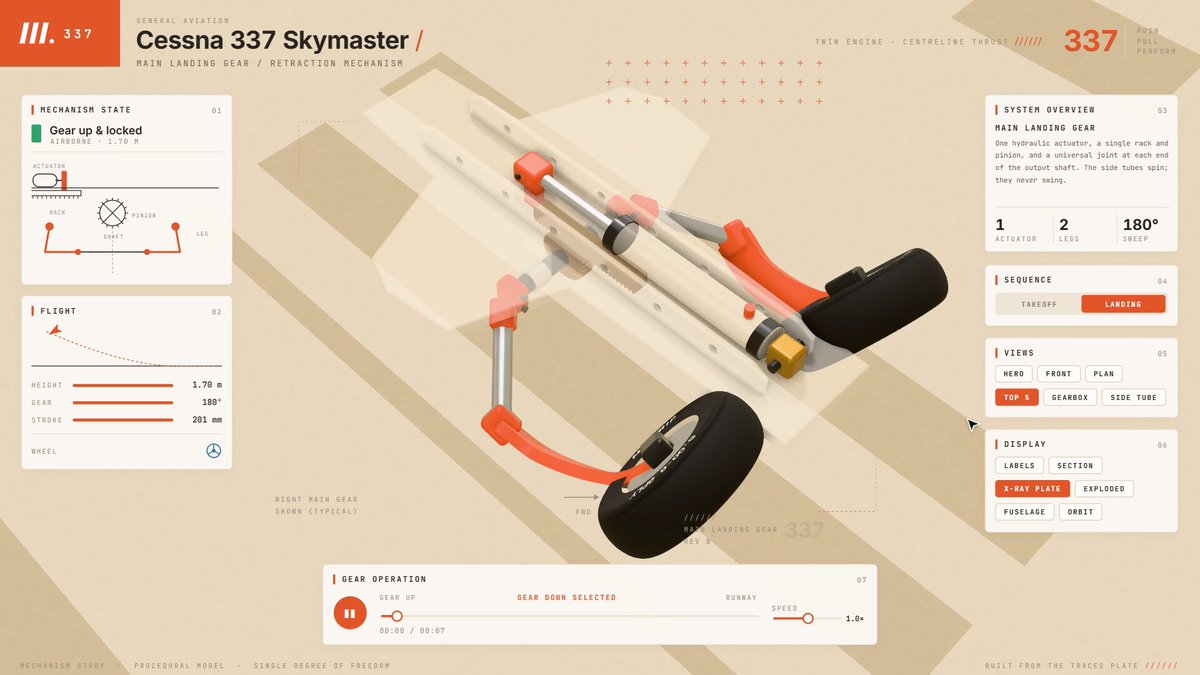
Cessna 337 主起落架:放下并锁死准备着陆,起飞后再收起;含 X 光、爆炸视图与剖切。
V8 和 Strandbeest 用的也是同一套提示词,只是换了方括号内容。Strandbeest 的模型就是 Theo Jansen 1990 年那 11 段连杆长度:转曲柄,每个关节用圆相交跟随。
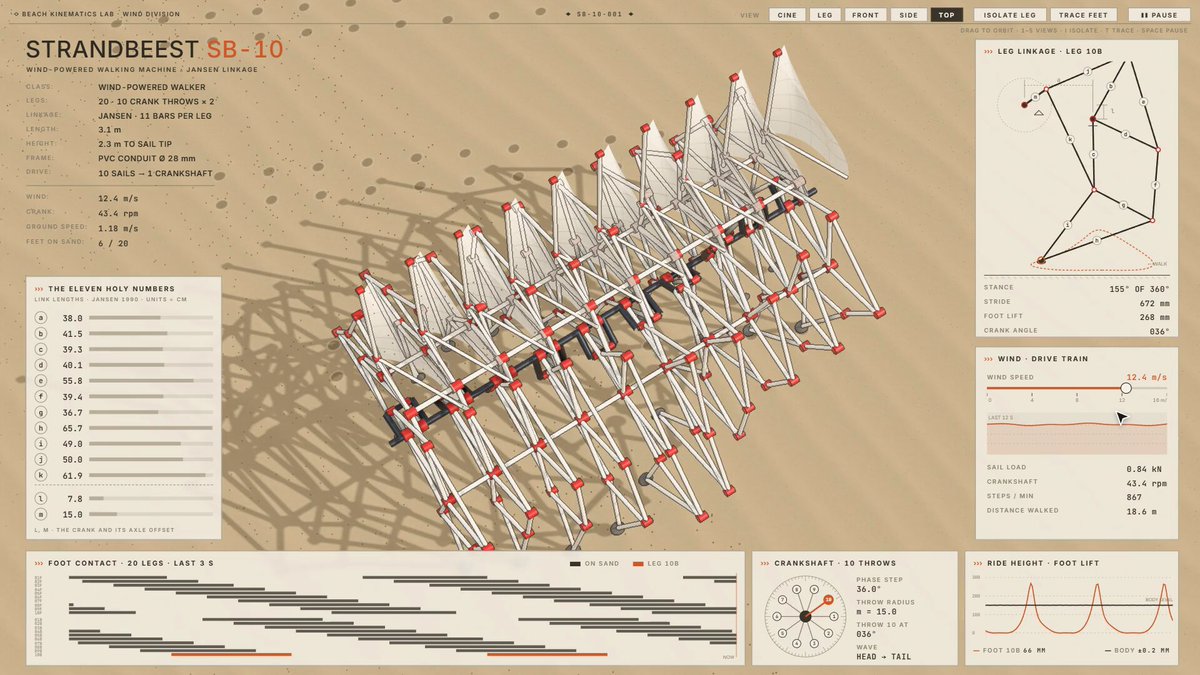
Strandbeest SB-10:风速从 12 降到 6 m/s,单腿一根一根拆开,全部 20 条足端轨迹画出。
第 4 步. 搭建控制台
中文版:
在机械周围按 1600×900 布置控制台:
- 左上角放大写标题和主实时数值:[发动机转速,单位 rpm]
- 随机械一起动的实时图表:[曲轴 720° 上的气门升程,被追踪气缸的压力-容积环]
- 一个从同一模型重绘机构的 2D 示意面板
- 每个子系统一个按钮:隔离它、剖开它、单独显示它
- 相机视角做成按钮:[英雄视角、前视、侧视、俯视、谷内视角]
- 带细引出线的标注,指向它们所命名的零件
每个面板都从当前帧状态重绘。屏幕上没有任何数字是手打上去的。
英文原文:
Lay out a console around the machine at 1600×900:
- the title and the main live number top left, big: [engine speed in rpm]
- live charts that move with the machine: [valve lift over 720° of crank, the pressure-volume loop of the tracked cylinder]
- a schematic panel that redraws the mechanism in 2D from the same model
- one button per subsystem: isolate it, cut it, show it alone
- camera views as buttons: [hero, front, side, top, inside the valley]
- callouts with thin leader lines into the parts they name
Every panel redraws from the frame's state. No number on screen is typed in.
跟着零件一起动的图表,才是让人留下来的原因。V8 上的压力环每 720° 曲轴转角闭合一次——你就看着它合上。
第 5 步. 定外观风格
中文版:
风格:浅色棚拍上的干净研究模型。
- 浅色背景,无形地面上的柔和阴影,当前正在工作的零件用一个强调色
- 机械占视图的 60% 到 70%
- 深色零件偏光泽,衬套用玻璃感,金属粗糙度至少 0.45,避免拉出白条高光
- 若零件接近白色,给它细墨描边或更深的底色
- 为机构挑相机:若正视会塌成一排栅格,就用 3/4 视角
英文原文:
Style: a clean study model on a pale studio.
- light background, soft shadows on an invisible floor, one accent colour for the part that is working right now
- the machine fills 60 to 70% of its view
- dark parts glossy, liners glass, metal roughness at least 0.45 so it never streaks white
- if a part is near-white, give it a thin ink outline or a darker ground
- pick the camera for the mechanism: if it collapses into a lattice face-on, use a 3/4 view
每一行都是一次踩坑后的修复。Strandbeest 的白管子在奶油色背景里消失了,直到我把它挪到沙地上并加了墨线描边。正视时 20 条腿会变成一道篱笆,所以相机坐在沿脊柱的 3/4 位。我那只兔子场景的暗色版本,则把信息流的第一秒画面弄丢了。
第 6 步. 像评论家一样检查
中文版:
在给我看任何东西之前:
1. 在导览的每一个节拍渲染静帧并逐张审读:零件穿模、零件浮空脱离安装点、标签盖住它所命名的东西、数字与姿态不一致。
2. 用 0.2 s 步进 scrub 每一个过渡,找跳变。
3. 用参数块里的数字修碰撞。永远不要用相机把问题藏起来。
告诉我你检查了什么、修了什么。把静帧给我看。
英文原文:
Before you show me anything:
1. Render a still at every beat of the tour and read each one: a part passing through another, a part floating off its mount, a label covering what it names, a number that disagrees with the pose.
2. Scrub every transition at 0.2 s steps and look for a jump.
3. Fix collisions with a number in the parameter block. Never hide them with the camera.
Tell me what you checked and what you fixed. Show me the stills.
这些静帧抓到了两个差点直接上线的 bug。兔子的脸会顶穿帽子壁,直到一个数字——0.222 m——把它塞回帽子里。六足机器人每次换步态时腿都会飞掉,直到脚尖对准了下一个真实落脚点。
第 7 步. 做成可驾驶的页面
中文版:
把模拟器做成人们可以自己开的页面:
- 影片里的导览自动播放,光标走到每个按钮并按下
- 任何点击、拖拽、滚动或按键都把控制权交给访客;安静 25 秒后再交还
- 拖拽环绕、滚轮缩放、按键隐藏面板
- 第一帧前预热每一个 shader,页面永不卡死
- 在核显上测试,并加入画质档位:关掉环境光遮蔽、降低像素比、缩小阴影、面板隔帧重绘
英文原文:
Make the simulator a page people drive:
- the tour from the film plays by itself, with a cursor that walks to each button and presses it
- any click, drag, scroll or key hands control to the visitor; 25 seconds of quiet hands it back
- drag to orbit, scroll to zoom, a key to hide the panels
- warm every shader before the first frame so the page never freezes
- test it on an integrated GPU and add quality steps: no ambient occlusion, a lower pixel ratio, smaller shadows, panels redrawn every other frame
核显(integrated GPU)是大多数人跳过的测试。六足机器人在核显上只有 15 fps。加了画质档位后跑到了 75。在一张沙丘页面上,拖慢的是同一个位移 shader 在每个顶点算了 5 遍。
第 8 步. 做成视频
录制——中文版:
录制导览:render(t) 必须是时间的纯函数,因此在无头 Chrome 里以 60 fps、1920×1080 画每一帧,再管道送入 ffmpeg,输出 H.264、yuv420p、faststart。然后给我看每个节拍的 contact sheet(缩略图拼版)。录制——英文原文:
Record the tour: render(t) has to be a pure function of time, so draw every frame at 60 fps at 1920×1080 in headless Chrome and pipe it into ffmpeg as H.264, yuv420p, faststart. Then show me a contact sheet of every beat.配乐——中文版:
在同一时间轴上用代码配乐:[92 bpm 的 Am9 和弦,每个做功冲程一个轻闷响,节气门开大时节拍收紧,每次按钮按下有轻点击声,节气门拖动时底下有渐强气流]。母带响度到 -14 LUFS,真峰值低于 -1 dB,再混进视频。配乐——英文原文:
Score it in code on the same timeline: [Am9 chords at 92 bpm, a soft thump on every power stroke so the beat tightens when the throttle opens, a quiet click on every button press, rising air under the throttle drag]. Master to -14 LUFS with the true peak under -1 dB and mux it into the video.屏幕录制在 GPU 吃紧时会掉帧。可 seek 的导览不会。V8 影片最终是 26 秒、189 个声音。每一个闷响都落在对应的做功冲程上。
第 9 步. 放到网上
中文版:
把模拟器发布成页面:
- HTML 控制在 1 MB 以内;大模型文件挪到页面旁边的独立文件
- 从最佳帧导出 1200×630 预览卡,使用绝对图片 URL
- 部署到 Vercel
英文原文:
Publish the simulator as a page:
- keep the HTML under 1 MB; move any large model out as a file next to the page
- a 1200×630 preview card from the best frame, with absolute image URLs
- deploy it to Vercel
1 MB 这条线来自一次翻车。我的兔子页面把模型塞在里面,重达 15.9 MB,X 从来不显示链接卡片。把模型挪出去后变成 967 KB,卡片就出现了。
加分项. 让他们把它玩到极限
中文版:
加一个滑条给 [风速,0 到 15 m/s],滑条一动就实时跑模型:[微风几乎转不动曲柄,大风让腿糊成残影]。结果显示在同一套仪表盘上。英文原文:
Add one slider for [the wind, 0 to 15 m/s] and run the model live when it moves: [a light breeze barely turns the crank, a gale makes the legs blur]. Show it on the same panels.谁能把机器推过极限,谁就真正学会了每个数字在干什么。
全部 6 台都在浏览器里免费运行:visual-learning.app。自己按按那些按钮。
在手机或笔记本核显上,首次加载会花几秒编译 shader。之后页面会自行降画质,以保住帧率。
Skill 里那 3 台是开源的:github.com/elvarofficial/teardown
原文: X Article by @elvar_official
演示站点: https://visual-learning.app
开源仓库: https://github.com/elvarofficial/teardown